Improvements Oct 29, 2026
Conversations UI: Live updates improvements
We've made the conversation UI more "Alive" with all possible elements being updated in real time, making real-time collaboration easier.
Improvements Oct 28, 2026
Agent can now filter results by price
The Agent now has more advanced price filtering, making suggestions more accurate when someone asks for a product in a price range or asking for chaper/more expensive variants.
Improvements Oct 28, 2026
AI Search: Search by image and voice
- Users can now search by voice ( all plaftorms )
- Users can now reference images when searching ( Shopify only )
Improvements Oct 28, 2026
Redesigned prompts and skills
Prompt is now split into "Rules" which allows for
- Easier management of prompt portions
- Easier to manage which rules apply for which channels ( easier to add an Instagram-only rule for example )
Rules and Skills get their own page. We've also redesigned the skill creation process for simpler UX. Additionally, you can use the Zipchat agentic assistant to build rules and skills for you.
Improvements Oct 21, 2026
Backend API: Purchase data and customer santiment
Backend API now includes purchases data and customer santiment
Improvements Oct 20, 2026
Improved subscription page
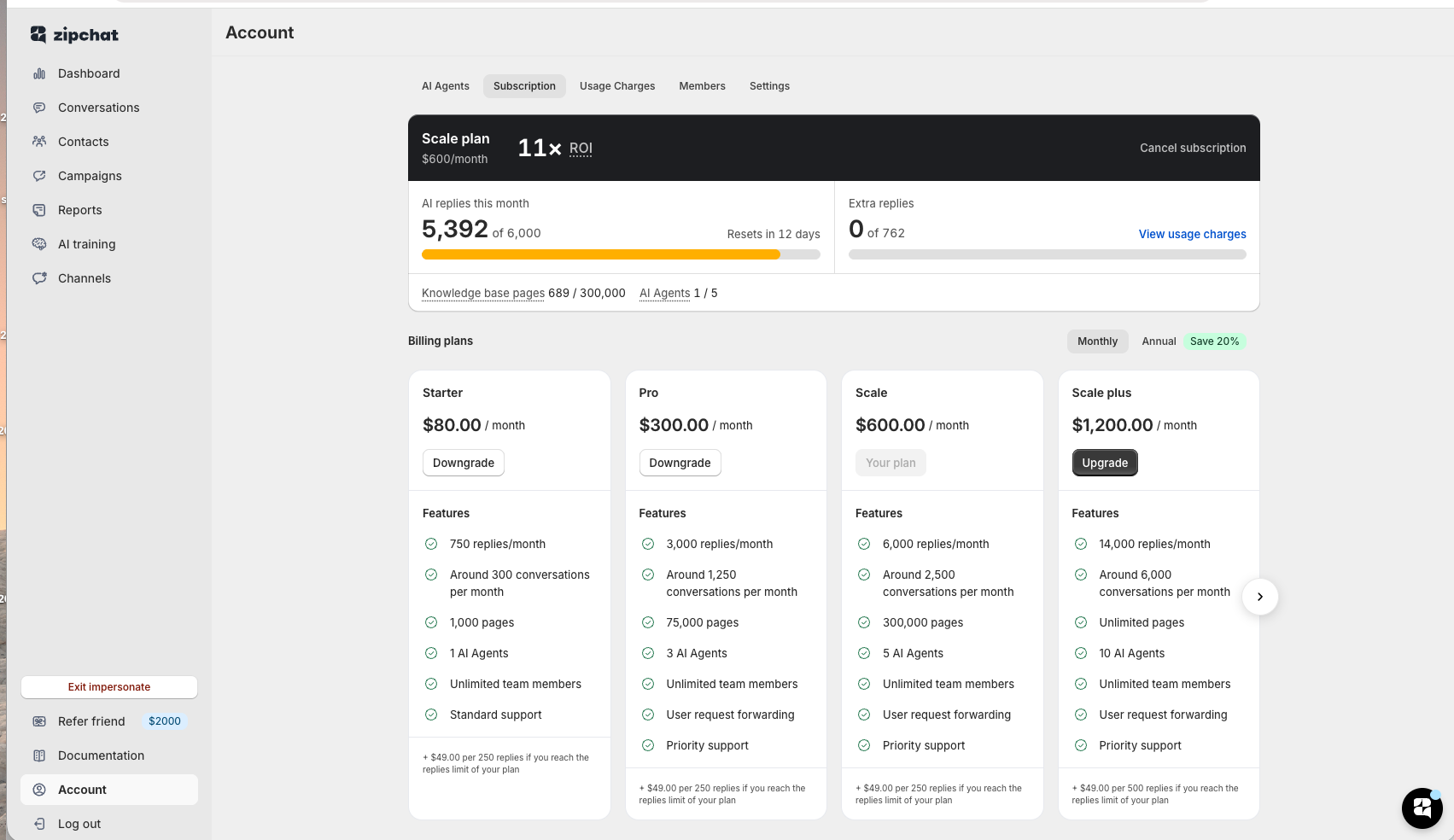
It's now easier to monitor your usage and understand when you need an upgrade
Features Oct 14, 2026
Introducing: the API channel
Put your Zipchat AI agent in your own app, help center or chat UI. Your backend sends a customer's question to the new Ask API and gets the agent's answer back, using the same knowledge, skills and tools as your other channels.
- Set it up under Channels > API: name an API key and copy it. API keys can only ask questions, so they're safe to give to the developer building your integration.
- Every customer's questions and answers are saved as a conversation in your Zipchat inbox.
- Stream the answer while it's written, just like in the Zipchat chat bubble.
- When a customer asks for a person, your team gets the request and follows up by email.
- Disconnect the channel at any time from its settings.
Read the docs: https://docs.zipchat.ai/api-developer-docs/ask-api
Improvements Oct 12, 2026
AI search - Improved search view
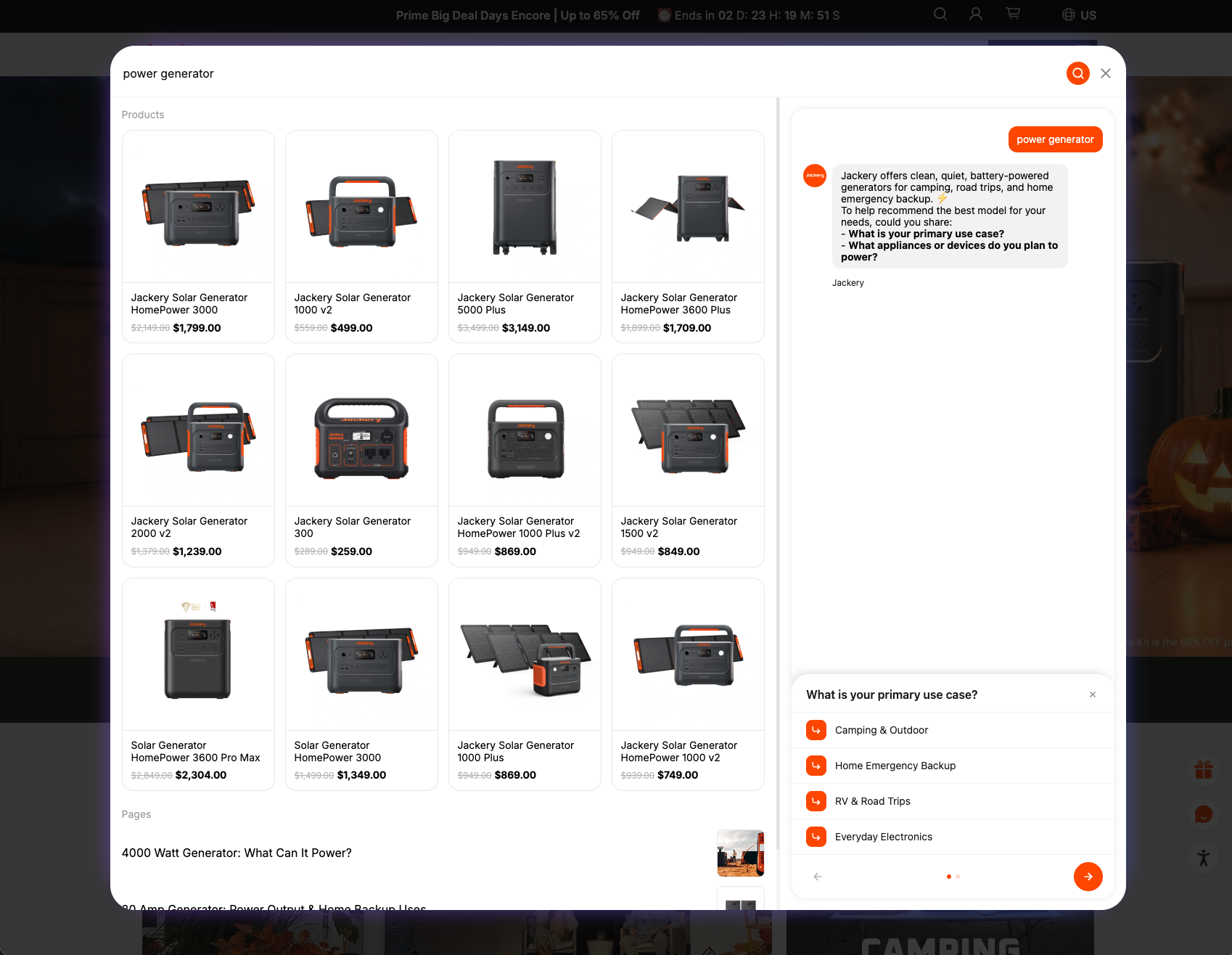
- AI search now features a grid view when it comes to showcasing products on Desktop
- On mobile the design stays the same
- Additionally, AI search sessions now have a 60minute expiry window
Improvements Oct 12, 2026
AI Search: Strike-price for non-Shopify stores
The AI search now features both the original price and discounted price of each product for all platforms ( Shopify and not-Shopify )
Features Oct 12, 2026
Target WhatsApp campaigns at customers with unpaid orders
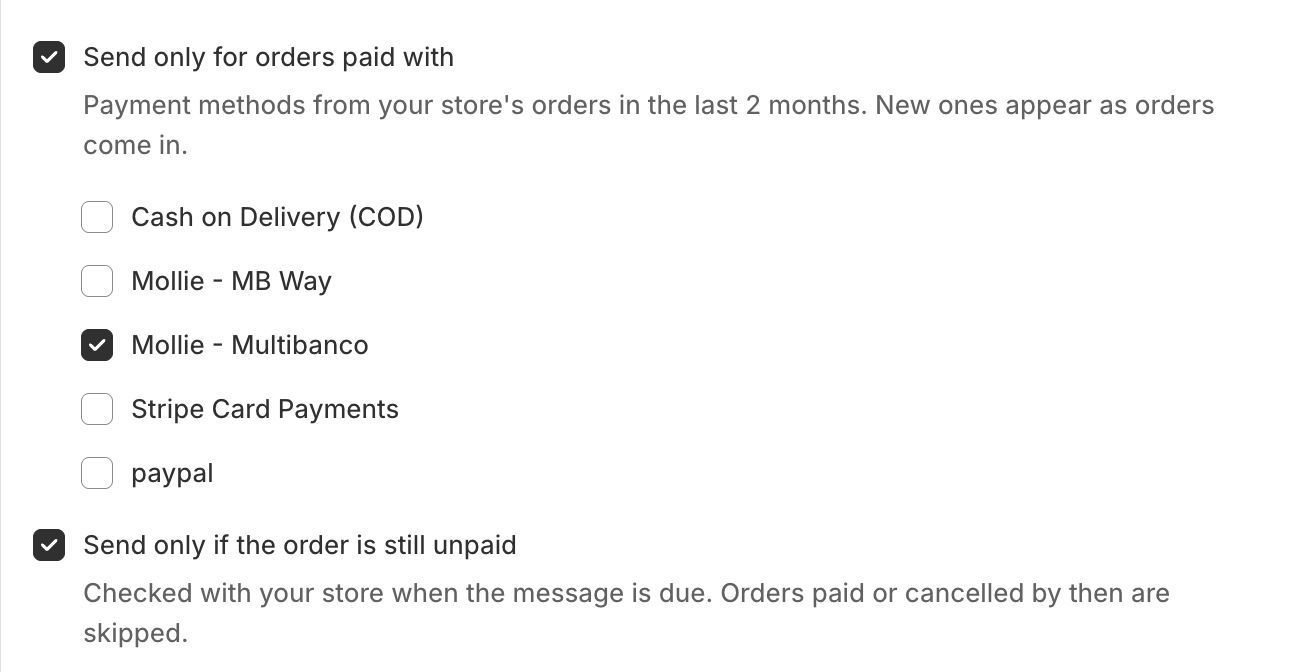
Add ability to target WhatsApp campaigns at customers with unpaid orders.
Improvements Sep 30, 2026
Product prices in chat previews for non-Shopify stores
Product previews in the chat widget now show prices when pricing information is available, including the selected variant’s price. Products without pricing information keep their existing preview.
Improvements Sep 29, 2026
Pre-order and backorder awareness for Shopify products
The bot now spots pre-order and backordered Shopify products, whether they're tagged "Preorder" or just oversold with "continue selling" on, and stops calling them "in stock, ready to ship" or quoting standard delivery times. It also refreshes a product's availability within seconds of a stock change.
Improvements Sep 29, 2026
Human agents can now send attatchments
When taking over a conversation, human agents can now attach images and files up to 10mb and send them over via Bubble Chat, Email, Messenger, Instagram DMs and WhatsApp
Improvements Sep 28, 2026
Variant-specific recommendations
Zipchat now specifies a variant when making product recommendations
- Product card in the Bubble chat will now show the right product image/price
- Customers will land on the right variant when clicking on a Zipchat link
Features Sep 23, 2026
Shared inbox
- You can now monitor all conversations on all of your AI agents from a unified view living under All Agents / Conversations
- We've also improved the speed of the Conversations and Knowledge-base views
Improvements Sep 23, 2026
AI search: Continue where you left off
Opening the AI search now continues where you left off on your last message, so you can continue looking at results
Improvements Sep 18, 2026
Support AI can now build custom skills
The Zipchat support AI can now build custom skills for you - just tell it what you need ; it will search the web for the API reference and built the skill itself
Improvements Sep 17, 2026
Annual plans
You can now subscribe to an annual plan and save 20% on your bill
Improvements Sep 17, 2026
Bubble chat: Bot protection
- You can now enable bot protection on the bubble chat in case you're getting bot traffic
To enable bot protection go to Chat Settings / Bubble Chat / Features
Improvements Sep 15, 2026
Improved Type Bar Bubble
We've redesigned the AI type bar bubble to make it easier for customers to start a conversations. Customers can now
- Type directly in the type bar without opening the chat
- Upload images
- Record a voice note
- Click suggesttion messages
Improvements Sep 14, 2026
WhatsApp campaigns: paced sending, clearer results, automatic pause
- One-off campaigns now go out gradually, about 200 messages a minute, instead of all at once, resulting in better performance during large campaigns.
- The campaign page shows exactly how many messages Meta accepted, delivered and read, and a "Why messages failed" breakdown explains every failure in plain language.
- If Meta pauses a template, blocks an account for billing, or the WhatsApp number stops working, the campaign pauses itself so the remaining contacts are kept. The page tells why and what to do next; merchant decide when to resume.
- Campaigns can be paused and resumed while sending, and the page shows how many contacts have been messaged and how many are still to go.
Improvements Sep 14, 2026
Prompt history
You can now restore previous versions of your prompts in case you made a mistake
Improvements Sep 11, 2026
AI Search: Instant results
- The AI search now serves instant AI responses whenever possible
- We now use crowdsourcing to pre-generate responses and provide an instant experience
Improvements Sep 11, 2026
Improved Channel settings on Bubble Chat, PDP Questions and AI Search
The settings are now split into sub-tabs for easier navigation
Improvements Sep 9, 2026
Backend API: Archived option
You can now archive or unarchive conversations via the Backend API. You can also filter conversations based on their last update.
Improvements Sep 8, 2026
Improved PDP questions
- Improves grounding of PDP questions to avoid generating questions which Zipchat doesn't know the answer to
- From now on PDP questions will be based on what's available on this particular page or will be regarding general brand policies
Improvements Sep 8, 2026
Custom-order tracking skill ( for non-shopify ) transitioned to custom skills
The legacy way to implement order tracking for non-Shopify merchants has been deprecated in favour of custom skills.
All merchants using the legacy skill now have a custom skill pre-made for them. The custom skills offer higher better flexibility and allow you to easily plug to any 3rd party fulfilment system.
Features Sep 4, 2026
Instagram story replies and mentions
Zipchat now understands Instagram stories.
- Story replies. When a customer replies to a story by a merchant, Zipchat "sees" it: image, text on image, video transcript. So "Is this one in stock?" gets an answer about the actual product in the story instead of a question back.
- Story mentions. When a customer mentions a merchant's account in their own story, Zipchat now picks it up, sees the story, and replies in the DM thread. Text written on the story is treated as the customer's message. These mentions used to be ignored.
- Inbox. Story-reply conversations show an "Instagram story URL" card in the sidebar linking to the story while it is live (24 hours).
Facebook page stories are not included: Meta's API does not tell us which story a Messenger reply refers to, so those replies are handled as regular messages.
Features Sep 2, 2026
Purchase attribution for Facebook, Instagram, Email, WhatsApp
Zipchat now tracks sales from offsite chanels (Facebook, Instagram, WhatsApp, Email). When an AI agent shares a product link it identifies the conversation it came from — so when the customer clicks it and buys on the store, the sale is credited to the right conversation and channel. The dashboard now breaks revenue down by every channel that actually sold, and when a customer interacts through several channels, the most recent touch gets the credit. Works automatically — no setup needed.
Improvements Sep 1, 2026
User rating of messages was depricated
Users can no longer rate individual messages with 👍 or 👎
We initially built the user rating system as a way to asses how good the AI responses are of an agent. However, a very small amount of customers rate these messages and customers mostly use the ratings to judge if the like the response or not, no matter if the response is accurate.
As we've using more sophisticated evals for the agents, we've removed this option to free up real estate on the bubble chat.
Improvements Aug 21, 2026
Improved conversations UI
- Better UI on smaller screens
- Added conversation santiment
Features Aug 20, 2026
New dashboard
We've completely rebuilt the Dashboard with deeper analytics and clearer attribution, especially useful if you're running multiple agents.
What's new:
- AI-powered revenue attribution: every purchase is now analyzed and tagged as Strongly influenced, Influenced, Pending, or Not influenced. Not influenced purchases are filtered out by default so your numbers reflect Zipchat's real impact
- Conversation funnel sentiment: each conversation is mapped to a stage (Discovery, Conviction, Post-purchase, or Other), giving you visibility into where customers are in their journey
- Support staff savings: see how much it would've cost to handle your conversations with a human agent, using a $4 per conversation default that you can adjust to your own numbers
- Working hours breakdown: see what percentage of your conversations happen outside your business hours, with working hours configurable directly from the Dashboard
- Total Zipchat Value and ROI: a combined view of the value Zipchat is generating, plus your calculated return on investment
- Combined dashboard for multi-agent accounts: if you run multiple agents, your homescreen now shows a unified view across all of them instead of switching between each one
This gives you a much clearer picture of what Zipchat is actually doing for your business, not just how many conversations happened.
Improvements Aug 19, 2026
Improved onboarding process
- We've reworked our onboarding to make it easier for new Agents to be launched
- Tips have been replaced with actionable next steps
Improvements Aug 19, 2026
AI Search: Improvements on non-Shopify stores
A bunch of upgrades on AI search for non-Shopify stores
- Product results are now pushed to the top
- Price is now included next to each product
- Out of stock products are marked
- "See all results" link option is added in the config
Improvements Aug 18, 2026
Merchant console: Improved layout
Improved spacings and page width consistency
Improvements Aug 17, 2026
Bubble chat: Smart link navigation
Updated behaviour when clicking on a link inside the Bubble Chat
- Whenever the URL is part of the same website, the customer will open the link in the same tab
- Whenever the URL is from another website, the customer will open the link a new tab
Improvements Aug 12, 2026
EU AI Act compliant branding
Zipchat now defaults to labeling AI-generated content as such, to comply with the EU AI Act's transparency requirements.
New agents across Bubble Chat, PDP Questions, AI Search, and Emails will show "AI agent by Zipchat" by default instead of "Powered by Zipchat." You can control this label from each channel's settings under Provider branding.
Existing agents keep their current "Powered by Zipchat" branding until you explicitly change it.
Improvements Aug 6, 2026
Agentic search: Faster replies and better UX
- Agentic search: AI replies are now 3 seconds faster to load
- The agentic search now relies on the user triggering the search ( pressing enter or clicking the search icon ) - this prevents situations where the reply is triggered while the user is still typing
- On mobile, when there are no search results for a given query, the agentic search will directly open the Agent conversation to attempt to find what the customer is looking for
Bugfixes Aug 3, 2026
AI: Improved language recognition
- Makes the AI's language recognition more stable, reducing cases where the AI would respond in the wrong language
Features Jul 29, 2026
Shopify Sidekick integration
Zipchat now works directly with Shopify Sidekick, so you can manage your AI agent without leaving the Shopify admin.
What's new: Sidekick can debug messages and explain why Zipchat responded the way it did, help you write and refine prompts, and build custom skills for your agent.
To use it, just ask Sidekick to help you Zipchat
Improvements Jul 28, 2026
Agentic Search: AI summary on mobile
Mobile customers now see a preview of the AI's response directly within the search results, matching what was already available on desktop.
Improvements Jul 28, 2026
Agentic Search: Free until September 31st 26'
Messages sent through the AI Search bar are now free and won't count toward your AI reply usage until September 31st.
This applies to the first message a customer sends when searching, the one that triggers the AI-powered results. Any follow-up messages the customer sends to continue the conversation are billed normally as AI replies.
This gives you a free window to try Agentic Search and see its impact on conversion before it counts against your plan.
Features Jul 28, 2026
Agent memory: Customer profiles
Zipchat now remembers customers across conversations, building a persistent profile of who they are and what's happened before.
The AI automatically extracts key memories from each interaction, such as reported issues, preferences, disputes, previous orders, and other important context, and stores them on the customer's profile. Zipchat also matches conversations from the same person across different channels, so a customer who reaches out via chat, email, or WhatsApp is recognized as one contact with one shared history.
Improvements Jul 24, 2026
Messenger & Instagram: Quick replies
Zipchat can now send interactive quick reply buttons in Messenger and Instagram conversations. When the AI asks a question with a set of options, customers see clickable buttons instead of having to type their answer. This makes conversations faster and reduces friction, especially for qualification questions, yes/no prompts, and multiple-choice scenarios.
Improvements Jul 17, 2026
WhatsApp: Quick replies
Zipchat can now send interactive quick reply buttons in WhatsApp conversations. When the AI asks a question with a set of options, customers see clickable buttons instead of having to type their answer. This makes conversations faster and reduces friction, especially for qualification questions, yes/no prompts, and multiple-choice scenarios.
Live on all WhatsApp-connected agents with no setup required.
No updates match this filter.
 Website chat Turns browsers into buyers on every page.
  WhatsApp Sell on the app your customers read.
  Instagram Answers every DM in seconds.
  Messenger Turns Facebook ad questions into sales.
  Email Answers every email in the same thread.
